Count edges with CTU
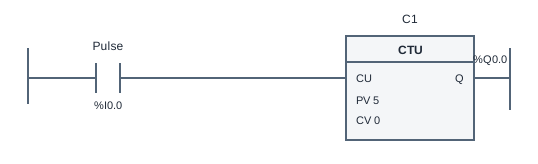
This CTU counter ladder logic example counts five separate product pulses before turning on BatchComplete. It demonstrates why counting events differs from counting scans. A product sensor can stay true across many scans, but that should still represent one event until it clears and becomes true again.
The Pulse contact drives the CTU count-up input. The counter increments CV on a false-to-true transition, called a rising edge. PV is the target value, set to 5. Q drives BatchComplete once CV reaches PV. The first four distinct rising edges leave the output false, and the fifth makes it true.
Holding Pulse true does not make a new rising edge on every scan. To add another count, Pulse must be false for an evaluated scan and then true again. A falling edge by itself does not count. This is why five press-and-release cycles are different from holding a button while the engine executes five scans.
Reset has priority over counting. When Reset is true, CV is cleared and Q is false even if Pulse is also true. The engine still remembers the input edge state: releasing Reset while Pulse remains held does not create a fresh count. Release Pulse and generate another rising edge before expecting the next item to register.
Try the program
- Open the simulator and inspect C1. Check PV = 5, Q bound to BatchComplete and the reset binding set to Reset. Start Run with both inputs released.
- Press Pulse and keep holding it. Observe that CV increases once and then stays unchanged. Release Pulse and let the engine evaluate the false state before pressing again.
- Repeat until five distinct pulses have occurred. Check that BatchComplete remains off at counts one through four and turns on at five. Observe CV as well as the output lamp.
- Press Reset to clear the batch. Also try Reset and Pulse together, then release Reset while keeping Pulse true. Run the acceptance cases to check target and reset behavior.
Use Load reference to restore the supplied solution, or Start blank to build your own. The reference is a working starting point, so passing tests before editing does not mean you have built the circuit yourself. Use the diagram, input values and test results together to explain each output change.
Practice challenge
Compare two input histories: Pulse true for 50 scans, and five true pulses separated by false scans. Predict CV and BatchComplete for each before running. Now insert Reset during the last held true input and predict what happens when Reset is released. State exactly which later input transition creates the next count. This exercise helps you distinguish the counter value, the current input level and the remembered edge state instead of treating them as the same thing.
Three common mistakes
Counting every true scan
An increment on every enabled scan measures input duration rather than separate products. Use the CTU instruction and watch CV while Pulse stays true to confirm one event creates one count.
Forgetting the release between pulses
Repeated clicks that never create a sampled false input cannot create new rising edges. Check Pulse in the variable table and allow the false state to be evaluated before the next press.
Expecting Reset release to count a held pulse
Reset clears the count but does not invent a new event. When Pulse was already true during reset, it must go false and rise again before the counter increments.
Questions about this example
Does a falling edge increase CV?
No. This CTU counts only false-to-true transitions. A release prepares the input for the next rising edge; it is not another product count.
What happens when Reset and Pulse are true together?
Reset wins: CV is zero and BatchComplete is false. A held Pulse does not count merely because Reset later becomes false.
Is the counter the same as a timer?
No. TON measures enabled simulation time. CTU counts distinct input transitions, so the same five events can take a short or long time without changing the target count.
Keep practicing
Review ladder logic basics, or compare this program with a related example:
All addresses and devices here are virtual. See supported instructions and limitations for the teaching subset, timing model and boundaries of the simulator.