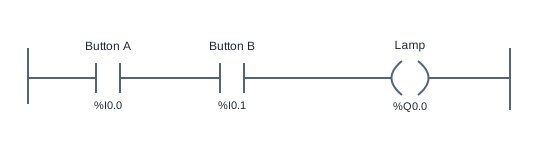
Series contacts implement AND
This ladder logic exercise requires two input conditions before a lamp can turn on. It extends Lamp Follow by placing Button A and Button B on the same series path. The result is a useful model for permissive logic: an output is allowed only while every required condition is true.
Read the two contacts along one branch. Logical continuity must pass through Button A and then Button B before reaching Lamp. If either NO instruction reads false, the path is interrupted. The expression is Lamp = ButtonA AND ButtonB. Moving the two contacts left or right within this simple Boolean series path does not change the result.
There are four input combinations. With neither button pressed, Lamp is false. With only A pressed, Lamp is still false. With only B pressed, Lamp is still false. With both pressed, Lamp is true. Checking only the final combination cannot establish that the program implements AND; a parallel OR program would also light the lamp with both inputs true.
This program has no latch or timing window. The engine reads the current inputs on each 20 ms logic scan. Pressing A, releasing it, and later pressing B does not combine the two events. Both bits must be true during the same evaluated scan. This is a Boolean learning example, not a certified two-hand machine control.
Try the program
- Open the simulator and start Run. Verify the lamp is off with both inputs released. Inspect the diagram and locate the two contacts on the same branch.
- Operate A alone, then B alone. The lamp must remain off in both cases. Use the input values in the variable table if holding two buttons is awkward on your device.
- Make both input bits true and confirm Lamp turns on. Clear either bit while keeping the other true; the lamp should turn off on the next evaluation.
- Run all acceptance cases. Rebuild the reference with Start blank if you want to practice inserting and binding contacts, then compare the result with the four combinations above.
Use Load reference to restore the supplied solution, or Start blank to build your own. The reference is a working starting point, so passing tests before editing does not mean you have built the circuit yourself. Use the diagram, input values and test results together to explain each output change.
Practice challenge
Write a four-row truth table with Button A, Button B and Lamp as its columns. Predict every row before using the simulator. Next, replace only the Button B instruction with NC and predict which single input combination should now light the lamp. Run that version, compare it with your table, then restore the original NO contact before checking the exercise. Explain why the arrangement is still AND even though one condition is inverted.
Three common mistakes
Putting the contacts on separate branches
Separate complete paths are OR. Either input could then energize Lamp, which fails the A-only and B-only cases. Keep both conditions on one branch to require them together.
Selecting the same variable twice
Two contacts labeled Button A implement A AND A, which is just A. Check each contact binding individually and confirm that the second reads Button B.
Treating sequential presses as simultaneous conditions
This circuit has no event memory. A press that ended before the next button was pressed does not remain available to the rung. Observe the current Boolean values rather than the order of earlier clicks.
Questions about this example
Does contact order matter for AND?
For these two ordinary Boolean contacts, A AND B and B AND A give the same output. Program scan order becomes important when separate rungs write values that later rungs read.
Can I add a third required condition?
Yes. Add another NO contact in the same series branch and bind it to a separate input. The output then requires all three conditions. The original exercise tests still describe only the supplied two-input task.
Is this a real two-hand safety controller?
No. The example demonstrates Boolean AND only. It does not implement timing supervision, anti-tie-down behavior, redundancy or certified hardware safety functions.
Keep practicing
Review ladder logic basics, or compare this program with a related example:
All addresses and devices here are virtual. See supported instructions and limitations for the teaching subset, timing model and boundaries of the simulator.