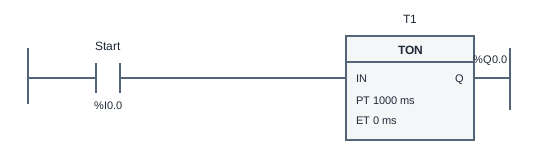
TON delays an output
This TON timer ladder logic example delays MotorRun until Start has remained true for 1000 ms of simulation time. It teaches the difference between an input being active and a timer being done. Releasing Start before the delay completes clears the elapsed time, so a later attempt must wait for the full interval again.
The Start contact drives the TON input. PT is the preset duration, ET is elapsed time, and Q is the done output bound to MotorRun. While the rung is true, each 20 ms scan advances ET toward PT. At PT = 1000 ms, the timer needs 50 enabled scans before Q becomes true. Before the fiftieth scan, MotorRun remains false.
This is a non-retentive on-delay timer. If Start becomes false, the timer resets ET to zero and Q becomes false. It does not preserve a partly completed delay, and it does not keep the motor running after Start is released. A latch and an on-delay solve different problems; this reference intentionally includes only the sustained input and timer.
Simulation time is based on executed scans. Pause freezes the engine rather than accumulating wall-clock time in the timer. Waiting while paused does not complete the delay. Browser scheduling can affect how quickly the animation appears to advance in real time; judge the logical timer using its ET value and deterministic acceptance cases.
Try the program
- Open the simulator and inspect T1. Confirm PT is 1000 ms and the timer done output is bound to MotorRun. Click Run with Start released.
- Hold Start and watch ET increase. MotorRun should remain off during the delay and turn on once ET reaches the preset. Continue holding Start to observe the done state.
- Release Start. Check that ET and MotorRun clear. Press again, release before one second, and press once more to verify that timing begins from zero.
- Pause during timing, wait, then resume. Run the supplied tests to verify the exact delay boundary, early release, repeated timing and reset behavior without relying on hand timing.
Use Load reference to restore the supplied solution, or Start blank to build your own. The reference is a working starting point, so passing tests before editing does not mean you have built the circuit yourself. Use the diagram, input values and test results together to explain each output change.
Practice challenge
Predict ET and MotorRun after 20 enabled scans, then after 49 and 50 scans. Repeat the prediction with one false-input scan inserted between the twentieth and twenty-first enabled scans. Does the first 400 ms still contribute? Use the non-retentive reset rule to explain your answer before running the program. Finish by restoring PT to 1000 ms so the supplied acceptance cases still describe the program you are checking.
Three common mistakes
Entering seconds where milliseconds are expected
The preset here is expressed in milliseconds. PT = 1 is not one second. Use 1000 for this exercise and inspect the unit shown on the timer block.
Using a normal coil instead of the timer output
A coil directly following Start energizes immediately. MotorRun must be driven by the TON Q output so the preset delay governs the result.
Expecting ET to survive a false input
TON resets when its input becomes false. If you tap Start several times, the short intervals do not add together. Hold the input continuously for the required delay.
Questions about this example
How many scans make one second?
With the fixed 20 ms logic scan, 1000 / 20 = 50 scans. This describes executed simulation time, not a guaranteed real-world browser scheduling interval.
What is the difference between TON and TOF?
TON delays turning its done output on after a true input. TOF is an off-delay concept that delays clearing an output after the input goes false. This simulator supports TON, not a TOF instruction.
Will a short Start press eventually start the motor?
No. Releasing Start resets this timer. A delayed start from a momentary command would require additional logic to hold the timer input; that is outside this exercise specification.
Keep practicing
Review ladder logic basics, or compare this program with a related example:
All addresses and devices here are virtual. See supported instructions and limitations for the teaching subset, timing model and boundaries of the simulator.